AgentHollow
Watch your AI coding sessions grow a calm, living pixel realm. Every session is a settler that walks out of the keep, gathers and builds; the tool it runs decides which workshop it visits, subagents become workers, and tokens fill the storehouse. No combat — just a quiet kingdom of work, at a glance.
npm i -g agent-hollow install once, then run
 hollow · needs Node 24.21+ (24 LTS)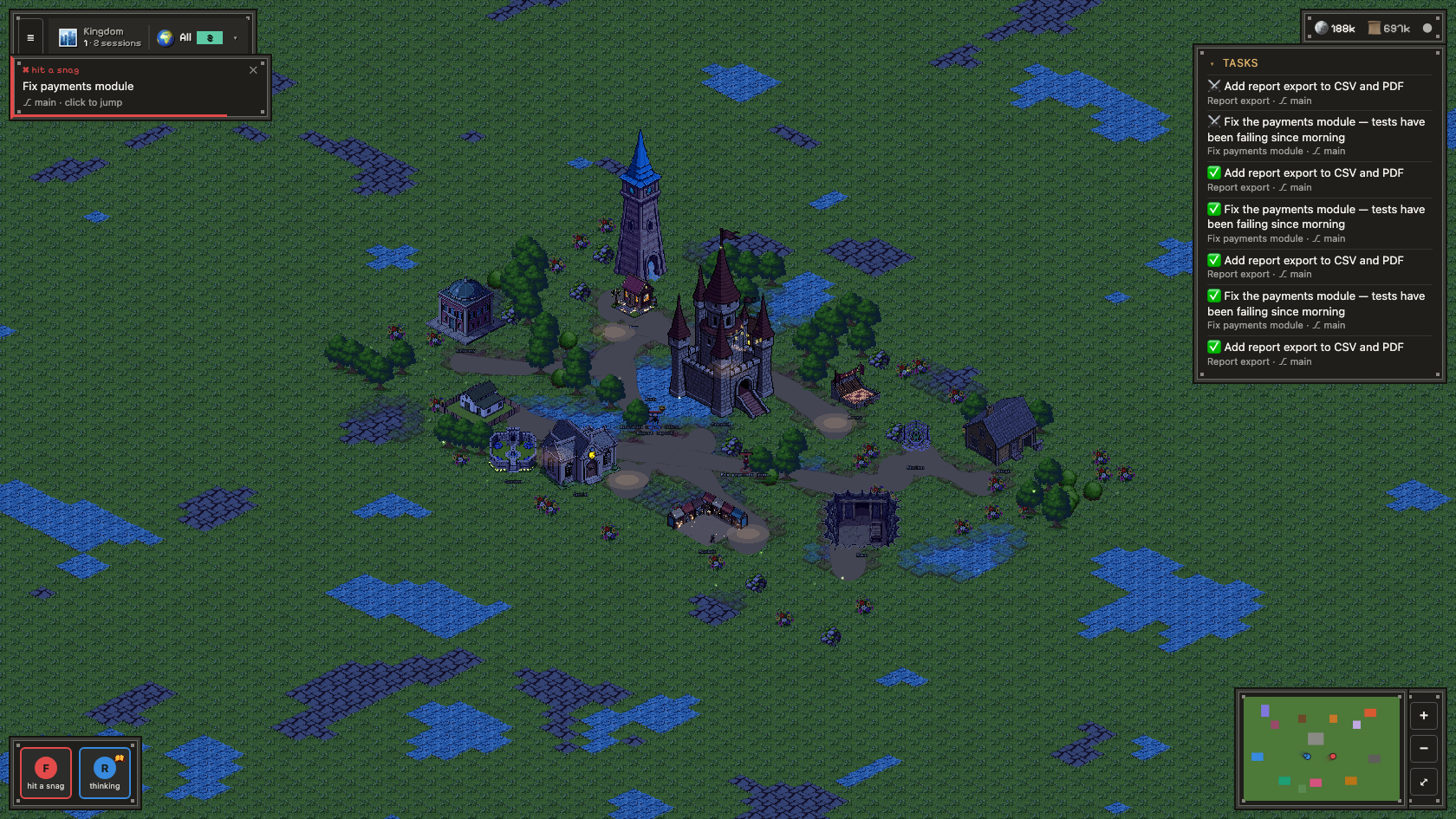
Every session settles the realm
A calm, second-monitor view of what your agents are quietly doing — no change to how you use the CLI.
Session → Settler
Start a Claude Code, Codex, OpenCode or Koda session and a settler walks out of the keep, carrying your prompt as its task for the day.
Tools → Workshops
The settler heads to the building that matches the work — the forge for edits, the mage tower for web research, the mine for the terminal.
Subagents → Workers
When a session spawns subagents, they appear as little workers busying themselves around their settler.
Tokens → Harvest
Tokens read and produced fill the storehouse. Settlers ponder while thinking, rest when waiting, and stroll home when the day's work is done.
Projects → Cities
Run many projects at once and each becomes a city you can switch between. Open one to inspect its Arsenal — the skills, connectors (MCP), hooks and subagents your sessions have actually used.
Fantasy & Sci-Fi
Two complete pixel-art realms — a sunlit medieval village and a quiet isometric colony on Mars.
Top-down · keep, mage tower, mine, orchard & ponds
How it works
Read-only, local, calm. The server knows what a session is doing; the client decides where each settler goes.
Transcript
Reads sessions from ~/.claude, ~/.codex, ~/.opencode & ~/.koda
State machine
Facts → thinking / working / resting / idle
WebSocket
Broadcasts a HeroSnapshot per session
PixiJS realm
Renders settlers, HUD, minimap & panels
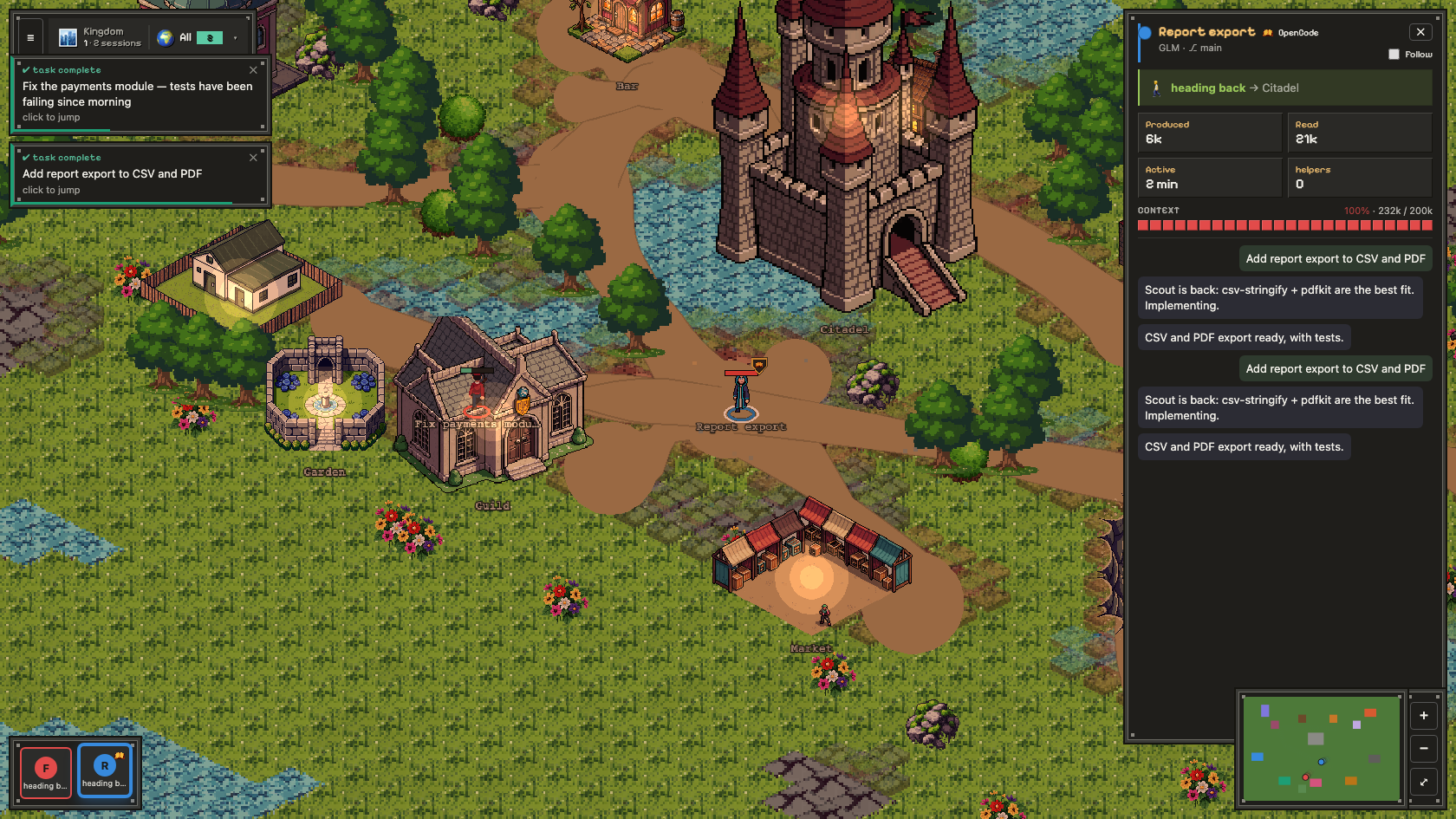
The session, in full
Click a settler to open its ledger: the current task, the tool in hand, tokens produced and read, how full its context window is, and a calm stream of recent actions — the whole session at a glance.
- Live task & objective tracking
- Token economy (produced / read)
- Context-window meter — how full the model's window is
- Recent-actions activity timeline
- Per-session status & helpers
Tune the realm to your stack
Sensible defaults out of the box — and everything that matters is yours to adjust, right from the gear menu.
Map tools to buildings
Decide which workshop each tool visits, and which live-log tools every building reacts to — edit it visually or as JSON, always kept in sync. Download and share your config.
A model registry
Teach the realm your models: which character each one appears as and how big its context window is — handy for custom or unfamiliar models, and for getting the 1M window right.
Speaks your language
The whole interface in English, Polski or Italiano — switch it any time.
Your view, your way
Mirror the entire city horizontally, flip between the Fantasy and Sci-Fi worlds, and let the camera follow any settler.
Start a Claude Code agent from the panel
With the optional Claude Agent SDK installed, a 🚀 Launch agent button lets you start a real Claude Code session from inside the realm — pick a folder, type a prompt, and answer its permission prompts, plan approvals and multiple-choice questions right in the panel. Real runs use your account and tokens.
# 1. install the optional SDK
❯ npm i @anthropic-ai/claude-agent-sdk

# 2. authenticate with your subscription (one time, opens a browser)
❯ claude setup-token          # prints a token
❯ export CLAUDE_CODE_OAUTH_TOKEN=<token>
❯ unset ANTHROPIC_API_KEY          # or it takes precedence

# 3. start the app from THAT shell, then click 🚀 Launch agent
❯ hollow
The SDK is optional — without it the button stays hidden. Without the token, launches fail with 401 Invalid authentication credentials. Usage bills against your Claude subscription (the OAuth token), not the metered API.
One command, no install
No accounts, no cloud. It runs entirely on your machine and only reads your sessions locally.
# install globally, then run with the short `hollow` command
❯ npm i -g agent-hollow
❯ hollow                      # prints the URL
❯ hollow --demo               # calm demo, fake sessions
❯ hollow --open               # open the browser too
❯ npm update -g agent-hollow   # update later

# or from source
❯ git clone https://github.com/acaylor/agent-hollow
❯ cd agent-hollow && pnpm install && pnpm run demo